Import Contact Template
You can use XLSX format files to add contacts to your application. You can download the sample file in sample XLSX template

Explanation
Name
The "Name" column is used to enter the name of the contact to be added.
Photo
The "Photo" column is used to enter the profile photo of the contact to be added.
Phone
The "Phone" column is used to enter the mobile number of the contact to be added.
The "Email" column is used to enter the email address of the contact to be added.
Address
The "Address" column is used to enter the home or work address of the contact to be added.
Labels
The "Labels" column is used to add a label for the contact to be added. You can add more than one label using the ":::" (three colons) delimiter.
Usage
The following is an example of using an XLSX file to add contacts:
- Go to the contacts menu, then select the import menu and click "Choose File."
- Select a file with the appropriate format.

- After the file is selected, valid contacts will appear.
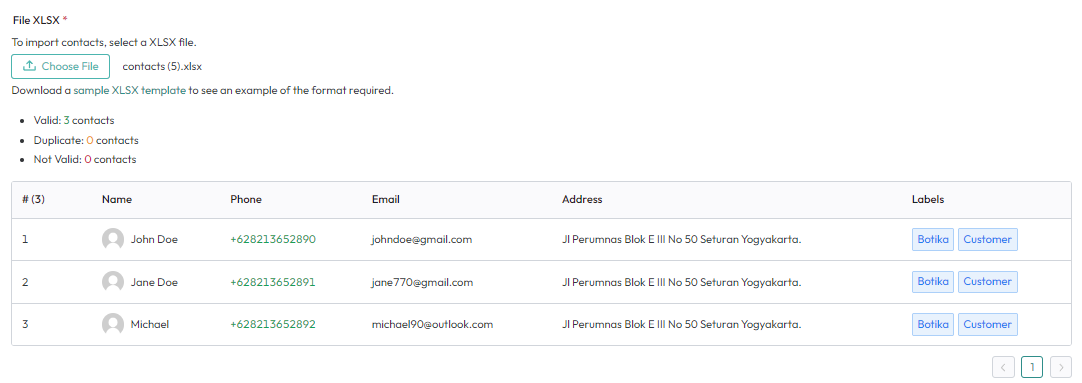
- Then, press "Import" to add contacts.
Template Column Rules
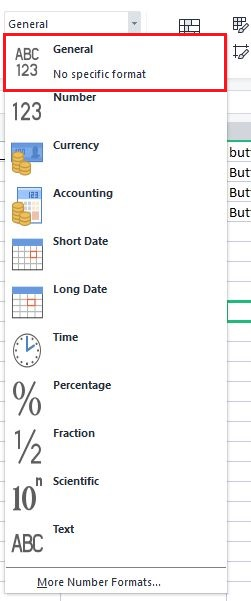
The column type in the template must be of general type to avoid errors.